TL;DR
- AI workflow automation helps a business read work, decide the next step, and move that step forward.
- The best first target is a broken handoff: a lead, quote, email, task, or document that waits too long.
- Start with one workflow, keep a human approval step, and track whether the next action happened.
AI workflow automation uses artificial intelligence to inspect work, make a decision, and move the next step forward across the tools a business already uses. The best place to start is not a giant AI plan. It is one broken handoff where leads, tasks, replies, or documents keep getting stuck.
Most AI workflow automation projects start in the wrong place.
They start with a tool.
They should start with a dropped ball.
I look for the moment where a real person thought someone else had it handled. The new lead came in. The quote went out. The document landed in an inbox. Then nothing happened. That is where AI can help.
Want to find the first workflow worth fixing? Run the AI Workflow Interview and get a practical starting point.
What is AI workflow automation?
AI workflow automation is the use of artificial intelligence inside a business workflow so work can be read, sorted, drafted, routed, or checked without waiting on a person to touch every step. Atlassian describes AI workflow automation as using AI to improve how workplace tasks move through a team. IBM explains that generative AI can support workflow steps like summarization, content generation, and data analysis.
Plain English version:
AI workflow automation helps the next step happen.
A normal automation might say, “When a form is submitted, send an email.”
An AI workflow can say, “When a form is submitted, read the message, decide whether it is urgent, draft the right reply, update the CRM, and tell the owner what to do next.”
That is a different animal.
How does AI workflow automation work?
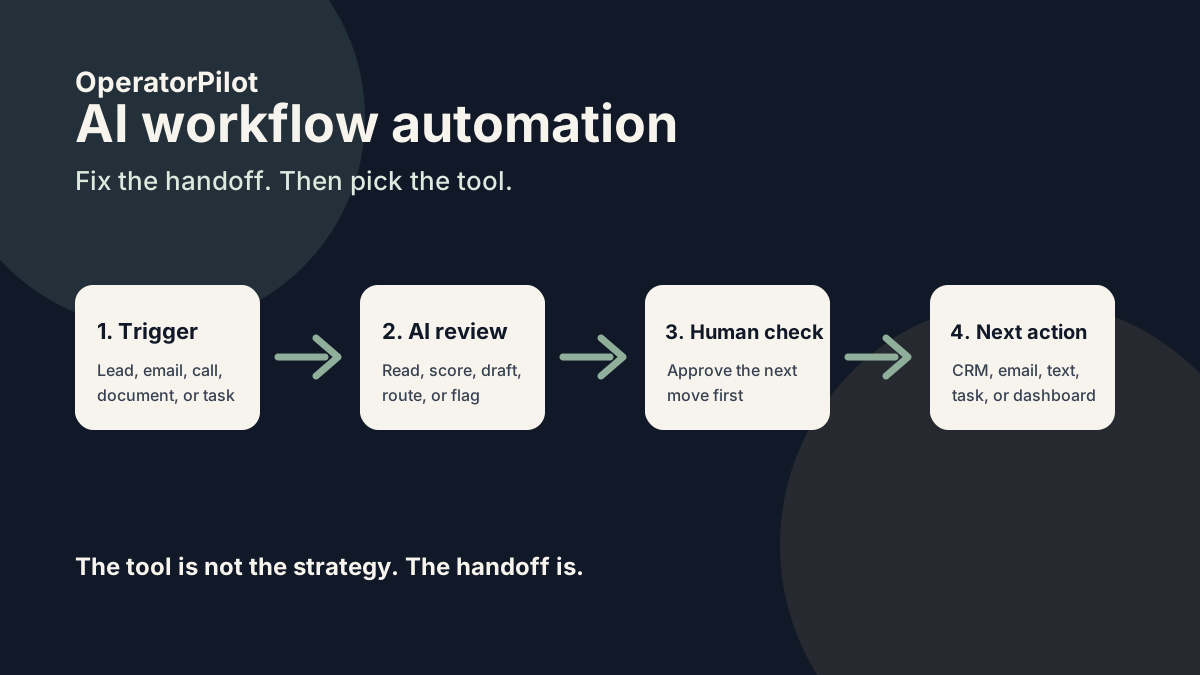
AI workflow automation works by combining a trigger, business context, an AI decision step, and a handoff. The trigger starts the workflow. The AI reads or reasons through the input. The system then sends the next action to a person, CRM, inbox, calendar, or task list.
A simple version looks like this:
- A lead, email, form, call, or document enters the business.
- The workflow captures the input.
- AI reads the content and decides what kind of item it is.
- AI drafts the next step or flags the right owner.
- A human reviews, approves, or acts.
- The system tracks whether the next step happened.
The last step matters most.
A lot of teams already have AI summaries. That is not enough. A summary without ownership is just another note nobody reads.
Where do AI workflows usually create the fastest win?
AI workflows usually create the fastest win where work is already happening but the handoff is weak. That means lead follow-up, quote follow-up, client intake, customer questions, document review, and internal approvals.
Here is the simple test:
If the business already says, “Someone should really keep an eye on that,” it might be a good AI workflow.
A small team does not need 40 AI agents. It needs one workflow that stops a costly miss.
For a commercial insurance agency, that might be a submission with missing documents. For a coach or consultant, it might be a booked-call lead who never gets a follow-up. For a local service business, it might be an after-hours inquiry that waits until Monday.
Different business. Same leak.
Common workflow leaks and the AI operator fix
| Broken handoff | What it looks like | Why it costs money | AI workflow fix |
|---|---|---|---|
| New lead comes in | A form gets submitted, but nobody replies for hours. | Speed-to-lead drops and the buyer talks to someone else. | AI scores the lead, drafts a reply, and alerts the owner right away. |
| Quote or proposal sent | The quote goes out, then sits with no next action. | Good opportunities quietly go cold. | AI tracks sent quotes and creates follow-up tasks or draft emails. |
| Customer asks a repeated question | The same question gets answered by hand every week. | Staff time gets eaten by low-value replies. | AI drafts a saved reply and routes edge cases to a person. |
| Document arrives by email | A PDF or attachment lands in an inbox with no clear owner. | Reviews slow down and missing information shows up late. | AI reads the document, summarizes it, and flags missing pieces. |
| Team member needs approval | Work waits because nobody knows who should sign off. | Bottlenecks hide inside Slack, email, and task tools. | AI identifies the needed approval and sends it to the right person. |
| After-hours inquiry arrives | A prospect calls or submits a form when nobody is working. | The lead cools off before the team sees it. | AI responds, gathers context, and queues the next action for morning. |
This is why I like the phrase “AI operator.”
The point is not the bot. The point is that something owns the follow-through.
What is the difference between automation and AI workflow automation?
Traditional automation follows rules. AI workflow automation can read messy inputs and help decide what should happen next.
A rule-based workflow is great when the input is clean.
Example:
“If someone fills out this form, add them to this list.”
AI workflow automation is better when the input is messy.
Example:
“Read this inquiry, figure out whether it is a hot lead, draft the right reply, and tell the owner what needs to happen next.”
Tools like Zapier, Make, n8n, and Activepieces can move data between apps. AI adds judgment, drafting, classification, and summarization inside that movement. n8n calls this the combination of AI with business process automation. Box also points out that AI can help with unstructured data like documents, PDFs, and business files.
The trap is letting the tool drive the project.
Wrong move.
Start with the handoff. Then pick the tool.
What should a small business automate first?
A small business should automate the workflow where delay, missed follow-up, or repeated manual work already costs money. Lead follow-up is often the best first target because the cost of a slow reply is easy to understand.
But lead follow-up is not always the answer.
Use this order:
- Pick one workflow with a clear start and finish.
- Name the human owner.
- Track what currently happens.
- Add AI only where judgment or drafting is needed.
- Keep a human approval step until the workflow proves itself.
That is boring on purpose.
The first workflow should not be clever. It should be useful.
A $20,000 AI build that nobody trusts is worse than a $1,500 workflow that gets used every day.
What tools are used for AI workflow automation?
AI workflow automation can use tools like Zapier, Make, n8n, OpenClaw, GoHighLevel, Airtable, Google Workspace, Slack, CRMs, AI voice tools, and large language models. Those names matter for search and for buyers who already use a tool, but they are not the strategy.
For owner-led businesses, the workflow map matters more than the tool list.
I would rather see a clear Google Sheet with real next actions than a fancy automation nobody checks.
Common pieces include:
- A trigger, like a form, email, call, or CRM update
- A place to store context, like a CRM, sheet, or database
- An AI step to read, classify, draft, or score
- A human approval point
- A handoff to email, SMS, task, calendar, or dashboard
- A check that confirms the next step happened
That last check is where many systems fail.
They create the task. They do not watch the task.
How much does AI workflow automation cost?
AI workflow automation can cost a few hundred dollars for a simple template or several thousand dollars for a custom workflow with CRM logic, AI prompts, human approval, reporting, and support. The price depends on risk, tool access, business complexity, and how much the workflow is worth when it works.
A simple starter workflow might include one lead source, one AI draft, one CRM update, and one human alert.
A bigger workflow might read documents, score urgency, check missing information, write follow-up, update records, and create a manager dashboard.
Those are not the same job.
For most small teams, the best first project is a paid workflow audit or small build. Find the leak. Fix one handoff. Then decide whether the system deserves more money.
How do you know if your business is ready?
A business is ready for AI workflow automation when the workflow already happens often enough to matter, the current process is visible, and the team knows what a good next step looks like. If nobody can explain the current process, AI will not save it.
AI hates fog.
Use these questions:
- Where does the workflow start?
- What should happen next?
- Who owns the next step?
- What counts as urgent?
- What information is missing most often?
- What does a good human response look like?
- How will we know the workflow worked?
If those answers are fuzzy, start with an audit.
OperatorPilot’s AI Workflow Interview is built for this. It forces the first hard choice: which workflow is worth fixing first?
How does this apply to commercial insurance agencies?
Commercial insurance agencies are a good example because the work is full of handoffs. A producer, CSR, account manager, carrier, and insured may all touch the same opportunity before a quote is bound.
That creates a lot of places for work to age quietly.
A submission comes in. A loss run is missing. A carrier asks a question. A quote needs follow-up. A producer assumes the CSR has it. The CSR assumes the producer has it.
Then the opportunity stalls.
OperatorPilot’s commercial insurance quote follow-up work focuses on those quiet stalls. The free guide, 7 Places Commercial Quotes Stall Before Anyone Notices, shows where those leaks tend to appear.
The lesson applies outside insurance too.
Any business with leads, quotes, documents, approvals, or follow-up has the same basic problem. Work gets stuck between people.
What is the fastest way to start?
The fastest way to start is to pick one handoff that already costs money and inspect it before building anything. Do not start with an AI tool list. Start with one live workflow and ask what happened the last 10 times it ran.
Here is the quick version:
- Pick one workflow.
- Watch the last 10 examples.
- Write down where the next step slowed down.
- Decide whether AI should read, draft, score, route, or remind.
- Build the smallest version with human review.
- Track whether the handoff improves.
Small is not weak.
Small is how you keep the system honest.
If you want a practical starting point, run the AI Workflow Interview. It will help you name the workflow, the owner, the stuck point, and the first AI-assisted handoff worth testing.
FAQ
What is AI workflow automation?
AI workflow automation uses artificial intelligence to help move work from one step to the next. It can read inputs, classify them, draft replies, summarize documents, score urgency, and route work to the right person.
Is AI workflow automation the same as Zapier or Make?
No. Zapier and Make are automation platforms that connect apps and move data. AI workflow automation may use those tools, but the AI layer adds reading, drafting, scoring, and decision support inside the workflow.
What is the best first AI workflow for a small business?
The best first AI workflow is usually the one tied to money. For many small businesses, that means lead follow-up, quote follow-up, missed calls, customer questions, or document intake.
Can AI workflow automation replace employees?
AI workflow automation should not start as an employee replacement plan. It works best as a follow-through layer that helps the team catch delays, draft replies, route work, and see what needs attention.
How long does it take to build an AI workflow?
A simple AI workflow can often be mapped in a day and built in a few days if the tools and process are clear. A complex workflow with approvals, CRM logic, document handling, and reporting can take weeks.
What tools do you need for AI workflow automation?
Most AI workflows need a trigger, a place to store data, an AI model, and a handoff tool. That might mean a form, CRM, Google Sheet, Zapier, Make, n8n, OpenClaw, Slack, email, SMS, or GoHighLevel.