TL;DR
- AI business process automation uses AI to help repeatable work move through a business with less manual drag.
- Start with a visible process, a named owner, and a clear approval point.
- Do not automate a process nobody can explain.
AI business process automation uses artificial intelligence to read, sort, draft, route, and check work inside a business process. It works best when the process is already clear enough to inspect. If nobody can explain the process, AI will just move the confusion faster.
That sounds harsh.
Good.
A lot of automation projects fail because the team tries to automate fog. The business process is half in email, half in Slack, half in someone’s head. Then everyone wonders why the AI build feels messy.
Start with the handoff. The page on AI workflow automation covers that idea in more detail.
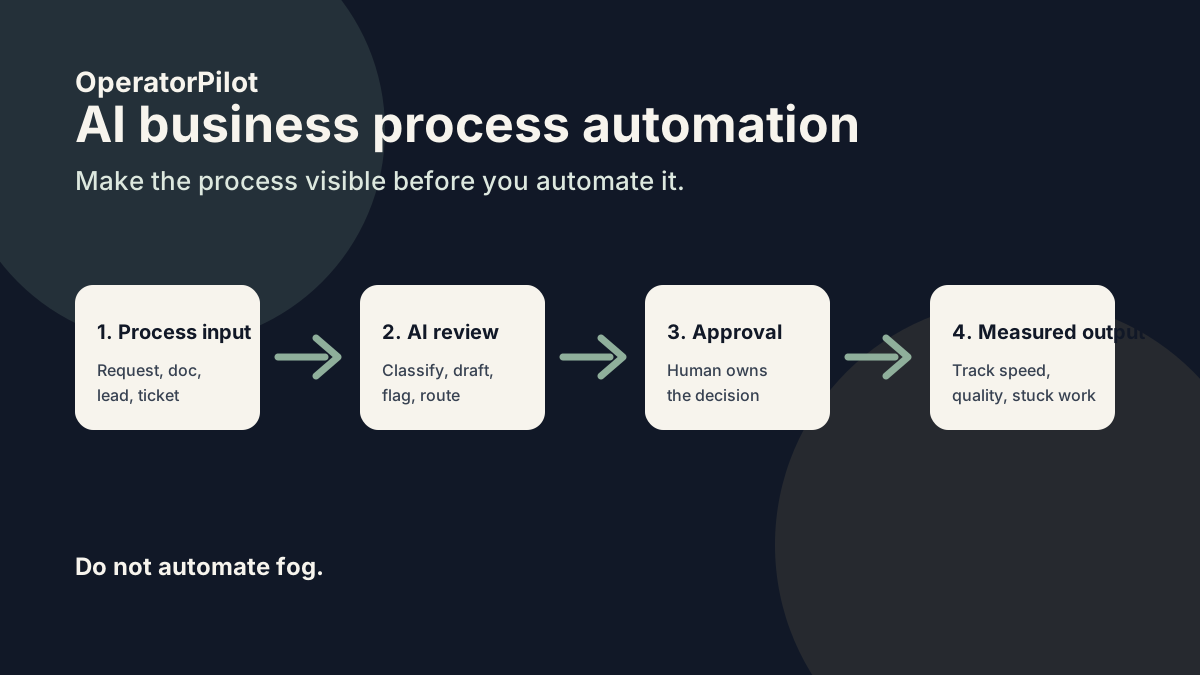
What is AI business process automation?
AI business process automation is the use of AI inside repeatable business processes so work can move faster with less manual handling. It can support intake, approvals, onboarding, reporting, support, document review, and follow-up.
Moveworks lists examples like HR onboarding, IT issue handling, payroll, compliance, and operations. Mistral AI has also written about workflows that use human approvals and measured process steps.
The common thread is simple: work moves through steps.
AI helps when one of those steps slows down.
What makes a process ready for AI?
A process is ready for AI when it has a clear start, a clear finish, and a person who owns the result. If the process is invisible, build visibility first.
- Can you show the last 10 examples?
- Can you name the owner?
- Can you define a good output?
- Can you describe what AI is allowed to do?
- Can a human review the risky parts?
If the answer is no, pause.
Where should a business start?
A business should start where process drag is already expensive. That might be lead routing, customer support, document intake, client onboarding, quote follow-up, reporting, or internal approvals.
The best first project has 3 traits:
- It repeats often.
- The next step is clear.
- A mistake is easy to catch before it hurts anyone.
That last part matters.
Business process leaks AI can fix
| Process leak | What it looks like | AI-assisted fix |
|---|---|---|
| Intake | Requests arrive messy and incomplete. | Summarize, classify, and flag missing info. |
| Approval | Work waits on a decision. | Route to the owner with context. |
| Follow-up | Tasks get created but not finished. | Track aging and draft reminders. |
| Reporting | Owner cannot see what is stuck. | Create a weekly stuck-work summary. |
What should you avoid automating?
Avoid automating high-risk judgment before the team trusts the process. Legal, financial, insurance, medical, hiring, and client-facing claims need human control.
AI can prepare the work.
A person should own the decision.
How do you measure AI process automation?
Measure whether the process moves better. Do not measure how fancy the system looks.
Track:
- response time
- stuck tasks
- missing information
- handoff delays
- review time
- completed next actions
If those numbers do not move, the automation is decoration.
FAQ
What is AI business process automation?
AI business process automation uses AI to help repeatable work move through a business process with less manual handling.
What is the difference between workflow and process automation?
A workflow is usually a specific path of steps. A business process is the broader operating pattern that may include many workflows.
Can AI automate complex business processes?
Yes, but the process should be mapped, tested, and reviewed before AI handles risky steps.
What is the best first business process to automate?
The best first process repeats often, has a clear owner, and creates visible drag when it stalls.